Google Apps Script, which is JavaScript that runs inside Google Sheets and Gmail.
mailmerge.gsGoogle Apps Script
// A mail merge for Google Sheets.
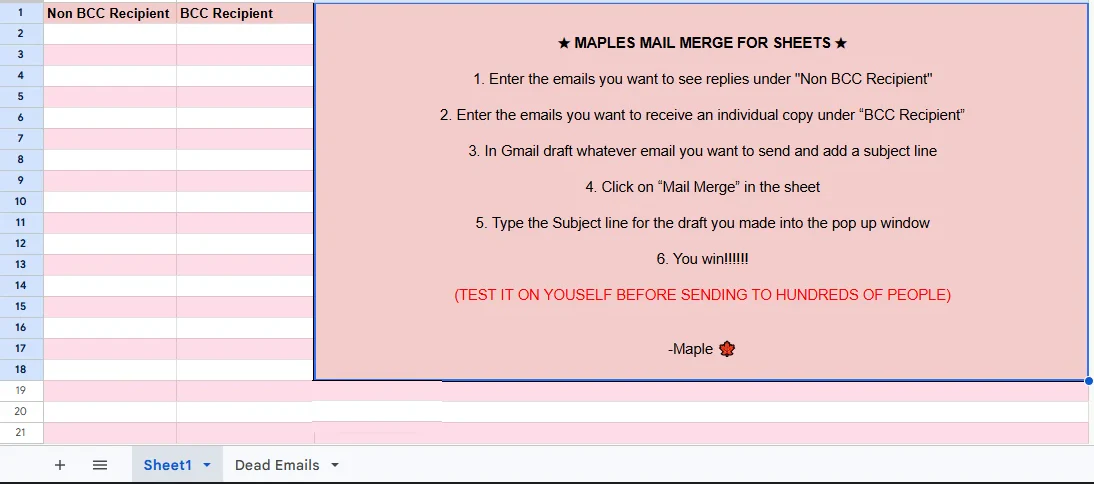
// Column "Non BCC Recipient": who the email is addressed to.
// Column "BCC Recipient": who gets a private copy.
// The email itself is a Gmail draft, picked by its subject line.

const NON_BCC_COL = "Non BCC Recipient";
const BCC_COL = "BCC Recipient";
const BOUNCE_BACK_SUBJECT = 'Delivery Status Notification (Failure)';
const BOUNCE_BACK_SENDER = 'mailer-daemon@googlemail.com';

// Adds a "Mail Merge" menu to the sheet when it opens.
function onOpen() {
  const ui = SpreadsheetApp.getUi();
  ui.createMenu('Mail Merge')
      .addItem('Send Emails', 'sendEmails')
      .addToUi();
}

// The main job: read the sheet, find the draft, send one email per row.
function sendEmails() {
  const sheet = SpreadsheetApp.getActiveSheet();
  const data = sheet.getDataRange().getValues();
  const headers = data[0];
  const nonBccIndex = headers.indexOf(NON_BCC_COL);
  const bccIndex = headers.indexOf(BCC_COL);

  // Ask which draft to send, by subject line.
  const subjectLine = Browser.inputBox("Mail Merge",
                                       "Type or copy/paste the subject line of the Gmail draft message you'd like to use:",
                                       Browser.Buttons.OK_CANCEL);
  if (subjectLine === "cancel" || subjectLine === "") {
    return;
  }

  const emailTemplate = getGmailTemplateFromDrafts_(subjectLine);

  // One email per row. A bad row is logged and skipped, not fatal.
  for (let i = 1; i < data.length; i++) {
    try {
      const msgObj = fillInTemplateFromObject_(emailTemplate.message, headers, data[i]);

      GmailApp.sendEmail(data[i][nonBccIndex], msgObj.subject, msgObj.text, {
        bcc: data[i][bccIndex],
        htmlBody: msgObj.html,
        attachments: emailTemplate.attachments,
        inlineImages: emailTemplate.inlineImages
      });

    } catch(e) {
      Logger.log("Error sending email for row " + i + ": " + e.message);
    }
  }

  // When the send is done, look for addresses that bounced.
  logBouncedEmails();
}

// Finds the Gmail draft with that subject and pulls out its text,
// formatting, attachments and inline pictures.
function getGmailTemplateFromDrafts_(subjectLine) {
  const drafts = GmailApp.getDrafts();
  const draft = drafts.filter(d => d.getMessage().getSubject() === subjectLine)[0];
  if (!draft) throw new Error("Can't find Gmail draft with subject: " + subjectLine);
  const msg = draft.getMessage();

  const allInlineImages = msg.getAttachments({includeInlineImages: true, includeAttachments: false});
  const attachments = msg.getAttachments({includeInlineImages: false});

  const inlineImages = {};
  allInlineImages.forEach(img => {
    inlineImages[img.getName()] = img;
  });

  return {
    message: {
      subject: subjectLine,
      text: msg.getPlainBody(),
      html: msg.getBody()
    },
    attachments: attachments,
    inlineImages: inlineImages
  };
}

// Swaps placeholders like {{Name}} for the value in that row's column.
function fillInTemplateFromObject_(template, headers, row) {
  let templateString = JSON.stringify(template);

  headers.forEach((header, index) => {
    templateString = templateString.replace(new RegExp('{{' + header + '}}', 'g'), row[index]);
  });

  return JSON.parse(templateString);
}

// Reads Gmail's unread bounce notices, pulls the dead address out of each one,
// writes them to a "Dead Emails" tab, and marks them in the main sheet.
function logBouncedEmails() {
    const threads = GmailApp.search(`from:${BOUNCE_BACK_SENDER} subject:${BOUNCE_BACK_SUBJECT} is:unread`);
    const deadEmails = [];

    for (let thread of threads) {
        let messages = thread.getMessages();
        for (let message of messages) {
            if (message.isUnread()) {
                let body = message.getPlainBody();
                const match = body.match(/Your message wasn't delivered to (.*?) because/);
                if (match) {
                    deadEmails.push(match[1]);
                } else {
                    Logger.log("Failed to extract email from: " + body);
                }
            }
        }
    }

    Logger.log('Dead emails extracted: ' + deadEmails);

    // Make the "Dead Emails" tab if it doesn't exist yet, then add to it.
    const ss = SpreadsheetApp.getActiveSpreadsheet();
    let deadEmailSheet = ss.getSheetByName("Dead Emails");
    if (!deadEmailSheet) {
        deadEmailSheet = ss.insertSheet("Dead Emails");
    }

    if (deadEmails.length > 0) {
        const lastRow = deadEmailSheet.getLastRow();
        deadEmailSheet.getRange(lastRow + 1, 1, deadEmails.length, 1).setValues(deadEmails.map(email => [email]));
    }

    // Flag dead addresses in the main sheet so they're skipped next time.
    const mainSheet = ss.getActiveSheet();
    const emailColumnData = mainSheet.getRange(2, 1, mainSheet.getLastRow()).getValues();
    for (let i = 0; i < emailColumnData.length; i++) {
        if (deadEmails.includes(emailColumnData[i][0])) {
            mainSheet.getRange(i + 2, 2).setValue("email dead");
        }
    }
}